Cross Join SQL
In this article, you will learn everything about cross join in SQL, including its definition, syntax, examples, advantages, disadvantages, and best practices. This beginner-friendly guide is written in easy English so anyone can understand it.
What Is Cross Join in SQL?
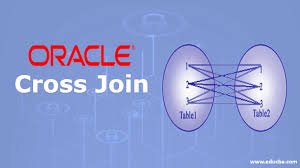
A Cross Join in SQL returns the Cartesian product of two tables. This means every row from the first table is combined with every row from the second table.
For example:
- Table A has 3 rows
- Table B has 4 rows
A cross join will produce:
3 × 4 = 12 rows
Unlike other joins, a cross join does not require a matching condition.
Easy Definition of Cross Join SQL
Cross Join SQL combines all records from one table with all records from another table.
It is useful when you want every possible combination of rows between two tables.
Syntax of Cross Join SQL
Here is the basic syntax:
SELECT column_name(s)
FROM table1
CROSS JOIN table2;
You can also write it without the CROSS JOIN keyword:
SELECT column_name(s)
FROM table1, table2;
However, using the explicit CROSS JOIN keyword is considered better practice because it improves readability.
Simple Example of Cross Join in SQL
Let’s understand with an easy example.
Table 1: Colors
| ColorID | Color |
|---|---|
| 1 | Red |
| 2 | Blue |
Table 2: Sizes
| SizeID | Size |
|---|---|
| 1 | Small |
| 2 | Medium |
| 3 | Large |
SQL Query
SELECT Colors.Color, Sizes.Size
FROM Colors
CROSS JOIN Sizes;
Result
| Color | Size |
|---|---|
| Red | Small |
| Red | Medium |
| Red | Large |
| Blue | Small |
| Blue | Medium |
| Blue | Large |
In this example:
- Each color is paired with every size.
- Total rows = 2 × 3 = 6 rows.
How Cross Join Works
A cross join works by creating every possible combination between two tables.
The database engine:
- Takes the first row from table 1
- Combines it with all rows of table 2
- Moves to the second row of table 1
- Repeats the process
This continues until all combinations are created.
Real-Life Uses of Cross Join SQL
Many beginners think cross joins are rarely used, but they can be very useful in specific situations.
1. Product Variations
E-commerce websites use cross joins to create product combinations.
Example:
- Colors
- Sizes
- Materials
Cross joins generate all possible product options.
2. Scheduling Systems
Cross joins help create all possible meeting times between:
- Employees
- Rooms
- Dates
3. Test Data Generation
Developers use cross joins to generate large datasets for testing applications.
4. Menu Combination Systems
Restaurants may use cross joins to combine:
- Main dishes
- Drinks
- Desserts
This creates meal combinations automatically.
Cross Join vs Inner Join
Many beginners confuse cross joins with inner joins.
Here is the difference:
| Feature | Cross Join | Inner Join |
|---|---|---|
| Matching Condition | Not Required | Required |
| Output | All combinations | Matching rows only |
| Result Size | Usually large | Usually smaller |
| Performance | Can be slower | Usually faster |
Example of Inner Join
SELECT Employees.Name, Departments.DepartmentName
FROM Employees
INNER JOIN Departments
ON Employees.DepartmentID = Departments.ID;
This query only returns matching records.
Example of Cross Join
SELECT Employees.Name, Departments.DepartmentName
FROM Employees
CROSS JOIN Departments;
This query returns every employee combined with every department.
Advantages of Cross Join SQL
Cross joins have several benefits when used correctly.
1. Creates All Possible Combinations
This is the main purpose of cross joins.
2. Simple Syntax
The syntax is easy to understand and write.
3. Useful for Data Analysis
Cross joins help analysts generate comparison datasets.
4. Great for Testing
Developers can quickly create large sample data.
Disadvantages of Cross Join SQL
Although useful, cross joins can create problems if not used carefully.
1. Large Result Sets
Cross joins can generate huge numbers of rows.
Example:
- Table A = 1,000 rows
- Table B = 2,000 rows
Result:
2,000,000 rows
This can slow down your database.
2. Performance Issues
Large cross joins consume:
- Memory
- CPU
- Storage
3. Difficult to Manage
Very large outputs become hard to analyze.
Best Practices for Using Cross Join SQL
To avoid problems, follow these best practices.
1. Use Cross Join Only When Necessary
Do not use cross joins accidentally.
Always confirm that you need every possible combination.
2. Filter Results with WHERE Clause
You can reduce large outputs using filters.
Example:
SELECT *
FROM Products
CROSS JOIN Categories
WHERE Categories.CategoryName = 'Electronics';
3. Limit Large Tables
Avoid cross joining massive tables unless absolutely necessary.
4. Use Explicit CROSS JOIN Syntax
This improves readability and prevents confusion.
Good:
SELECT *
FROM A
CROSS JOIN B;
Avoid:
SELECT *
FROM A, B;
Cross Join with Multiple Tables
You can also cross join more than two tables.
Example
Table 1: Colors
- Red
- Blue
Table 2: Sizes
- Small
- Large
Table 3: Materials
- Cotton
- Wool
SQL Query
SELECT *
FROM Colors
CROSS JOIN Sizes
CROSS JOIN Materials;
Result
Every color is combined with every size and every material.
Total rows:
2 × 2 × 2 = 8 rows
Using Cross Join with WHERE Clause
A WHERE clause can help narrow down combinations.
Example
SELECT *
FROM Students
CROSS JOIN Courses
WHERE Courses.CourseName = 'Mathematics';
This only shows combinations involving Mathematics.
Cross Join in Different SQL Databases
Cross join works similarly in most database systems.
MySQL
Supported using CROSS JOIN.
SQL Server
Fully supports cross joins.
PostgreSQL
Cross join works exactly the same.
Oracle Database
Also supports cross join syntax.
Common Mistakes Beginners Make
Understanding common mistakes can help you avoid errors.
1. Forgetting the Join Condition in INNER JOIN
Sometimes developers accidentally create a cross join by forgetting the ON condition.
Example:
This may create a Cartesian product unintentionally.
2. Cross Joining Large Tables
Huge tables can crash queries or slow systems.
3. Not Using Filters
Without filters, results may become unmanageable.
Performance Tips for Cross Join SQL
Performance matters when working with databases.
Use Small Tables
Cross joins work best with smaller datasets.
Apply Conditions Early
Filtering data before joining improves performance.
Example:
SELECT *
FROM
(
   SELECT * FROM Products WHERE Active = 1
) AS ActiveProducts
CROSS JOIN Categories;
Analyze Execution Plans
Database tools can help identify slow queries.
Practical Business Example
Imagine an online clothing store.
Colors Table
- Black
- White
- Blue
Sizes Table
- S
- M
- L
Styles Table
- Casual
- Formal
A cross join creates all possible product combinations automatically.
SQL Query
SELECT *
FROM Colors
CROSS JOIN Sizes
CROSS JOIN Styles;
Total Combinations
3 × 3 × 2 = 18 combinations
This helps businesses manage inventory efficiently.
When Should You Use Cross Join?
Use cross joins when:
- You need all possible combinations
- You are generating test data
- You are building configuration systems
- You are creating product variations
Avoid cross joins when:
- You only need matching rows
- Tables are extremely large
- Performance is critical
Difference Between Cartesian Product and Cross Join
These terms are closely related.
- A Cross Join is the SQL operation.
- A Cartesian Product is the result produced.
So, cross join creates a Cartesian product.
Advanced Example of Cross Join SQL
Here is a more advanced example.
Employees Table
Shifts Table
Query
SELECT Employees.Employee, Shifts.Shift
FROM Employees
CROSS JOIN Shifts;
Output
This can help managers assign shifts.
Conclusion
Cross Join SQL is a powerful feature that creates every possible combination between tables. Although it is simple to understand, it should be used carefully because it can generate very large result sets.
By learning cross joins, you improve your SQL skills and gain a better understanding of database relationships and data generation techniques.
About the Author