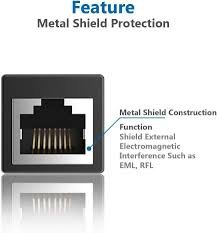
RJ45 Coupler
RJ45 couplers are popular because they are affordable, easy to use, and do not require technical expertise. Whether you want to extend your internet connection to another room or fix a cable that is too short, an RJ45 coupler provides a quick and practical solution.
How an RJ45 Coupler Works
An RJ45 coupler works by joining two Ethernet cables through its internal connectors. Each cable plugs into one side of the coupler, creating a continuous network connection. The coupler maintains the electrical signal flow between the cables, allowing data to travel from one device to another.
Most RJ45 couplers support standard Ethernet cable types, including Cat5, Cat5e, Cat6, Cat6a, and Cat7. Some advanced models also support shielded cables for better protection against electromagnetic interference.
The device itself does not boost or amplify signals. Instead, it acts as a passive connector that helps extend cable length while maintaining network performance.
Main Uses of an RJ45 Coupler
RJ45 couplers are used in many networking situations. Here are some common applications:
1. Extending Ethernet Cable Length
One of the most common uses is extending a network cable that is too short. Instead of buying a new longer cable, users can connect two existing cables with a coupler.
2. Temporary Network Setups
During events, conferences, or temporary office setups, RJ45 couplers help create quick network extensions without complex installations.
3. Repairing Damaged Cables
If a section of an Ethernet cable is damaged, users can cut the damaged part and reconnect the remaining cable segments using RJ45 connectors and a coupler.
4. Home Networking
Many homeowners use RJ45 couplers to improve internet connectivity in rooms far from the router.
5. Office and Commercial Networks
Businesses often use RJ45 couplers to expand network infrastructure without major rewiring.
Types of RJ45 Couplers
There are several types of RJ45 couplers available in the market. Choosing the right one depends on your network needs.
Inline RJ45 Coupler
This is the most common type. It has two female RJ45 ports and is used to join two Ethernet cables directly.
Shielded RJ45 Coupler
Shielded couplers are designed for environments with high electrical interference. They work best with shielded Ethernet cables and help reduce signal noise.
Keystone RJ45 Coupler
A keystone RJ45 coupler fits into wall plates or patch panels. It is commonly used in professional networking installations.
Waterproof RJ45 Coupler
These couplers are designed for outdoor use or industrial environments where moisture protection is important.
Cat-Specific RJ45 Couplers
Some couplers are built specifically for Cat5e, Cat6, or Cat7 cables to ensure maximum performance and compatibility.
Benefits of Using an RJ45 Coupler
RJ45 couplers offer many advantages for network users.
Easy Installation
No special tools or technical skills are required. Simply plug the cables into both ends.
Cost-Effective Solution
Buying a coupler is usually cheaper than purchasing a brand-new long Ethernet cable.
Flexible Networking
RJ45 couplers allow users to modify or extend networks quickly.
Portable and Compact
The small size makes it easy to carry and use anywhere.
Supports High-Speed Data Transfer
High-quality RJ45 couplers can support Gigabit Ethernet and even higher speeds when paired with compatible cables.
RJ45 Coupler vs RJ45 Connector
Many people confuse RJ45 couplers with RJ45 connectors, but they serve different purposes.
An RJ45 connector is the plastic plug attached to the end of an Ethernet cable. It is used to connect the cable directly to devices like routers, switches, or computers.
An RJ45 coupler, on the other hand, connects two Ethernet cables together. It acts as a bridge between cables rather than connecting directly to devices.
Understanding the difference helps users choose the correct networking accessory.
Does an RJ45 Coupler Affect Internet Speed?
A common concern is whether using an RJ45 coupler reduces internet speed. In most cases, a high-quality coupler will not noticeably affect performance.
However, poor-quality couplers or incompatible cable combinations may lead to signal loss, slower speeds, or unstable connections. To maintain optimal performance, users should:
- Choose high-quality couplers
- Match cable categories correctly
- Avoid excessive cable lengths
- Use shielded couplers in high-interference environments
When installed properly, an RJ45 coupler can maintain fast and reliable network performance.
How to Choose the Best RJ45 Coupler
Selecting the right RJ45 coupler is important for network reliability.
Check Cable Compatibility
Ensure the coupler supports the cable category you are using, such as Cat5e or Cat6.
Consider Speed Requirements
If you use high-speed internet or Gigabit networking, choose a coupler designed for high data transfer rates.
Decide Between Shielded and Unshielded
Shielded couplers are better for industrial or high-interference environments.
Build Quality Matters
Metal housing and gold-plated contacts usually provide better durability and signal performance.
Indoor or Outdoor Use
For outdoor installations, waterproof or weather-resistant couplers are recommended.
Installation Guide for an RJ45 Coupler
Installing an RJ45 coupler is simple and takes only a few minutes.
Step 1: Inspect the Ethernet Cables
Check both cables for visible damage or bent connectors.
Step 2: Match Cable Categories
For best performance, use cables of the same category.
Step 3: Plug the First Cable Into the Coupler
Insert the RJ45 connector into one side until it clicks.
Step 4: Connect the Second Cable
Insert the second cable into the other side of the coupler.
Step 5: Test the Connection
Check internet connectivity or network performance to confirm proper operation.
The process is straightforward and requires no advanced networking knowledge.
Common Problems With RJ45 Couplers
Although RJ45 couplers are reliable, some issues may occur.
Loose Connections
Poorly connected cables can cause intermittent internet problems.
Speed Reduction
Low-quality couplers may not support modern high-speed networking standards.
Signal Interference
Unshielded couplers may experience interference in environments with electrical equipment.
Compatibility Issues
Using mismatched cable categories can reduce network efficiency.
Most of these problems can be avoided by using quality products and proper installation techniques.
RJ45 Coupler for Gaming and Streaming
Online gamers and video streamers often need stable internet connections. RJ45 couplers can help extend Ethernet cables to gaming consoles, smart TVs, or desktop PCs.
Wired Ethernet connections generally provide lower latency and more stable performance compared to Wi-Fi. A properly installed RJ45 coupler helps maintain reliable connectivity for:
- Online gaming
- HD and 4K video streaming
- Video conferencing
- Large file transfers
- Remote work setups
Using a good-quality coupler ensures minimal signal loss and consistent network speeds.
RJ45 Coupler in Professional Networking
In professional environments, RJ45 couplers are often used in structured cabling systems. Network technicians may use them during maintenance, troubleshooting, or temporary network expansions.
Keystone couplers are especially popular in server rooms and office buildings because they fit neatly into patch panels and wall outlets.
Professional-grade couplers are designed to meet industry standards for speed, durability, and signal integrity.
Difference Between Cat5e and Cat6 Couplers
Cat5e and Cat6 are two popular Ethernet cable standards. Their couplers are similar but designed for different performance levels.
Cat5e Coupler
- Supports speeds up to 1 Gbps
- Suitable for most home networks
- Lower cost
Cat6 Coupler
- Supports higher bandwidth
- Better performance for high-speed networks
- Improved shielding and reduced crosstalk
If your network uses Cat6 cables, it is best to use a Cat6-compatible coupler for maximum performance.
Are RJ45 Couplers Safe to Use?
Yes, RJ45 couplers are generally safe when used correctly. They are low-voltage networking accessories and do not carry dangerous electrical currents.
To ensure safe operation:
- Avoid using damaged cables
- Keep couplers away from water unless waterproof
- Use quality products from trusted manufacturers
- Avoid overextending cable lengths beyond Ethernet standards
Proper use helps maintain both safety and network reliability.
RJ45 Coupler Buying Tips
Before purchasing an RJ45 coupler, consider the following tips:
Read Customer Reviews
Reviews can help identify reliable brands and models.
Compare Specifications
Check speed support, shielding, and cable compatibility.
Choose Trusted Brands
Well-known networking brands often provide better quality and durability.
Buy Extra Couplers
Having spare couplers can be useful for emergencies or future network expansions.
Verify Ethernet Standards
Make sure the coupler supports modern standards such as Gigabit Ethernet.
Future of RJ45 Couplers
As internet speeds continue to increase, networking accessories are also improving. Modern RJ45 couplers are now designed to support faster data transfer rates and advanced cable standards.
With the rise of smart homes, remote work, cloud computing, and online entertainment, Ethernet networking remains important. RJ45 couplers continue to provide a simple and affordable way to extend and maintain network connections.
Manufacturers are also focusing on better shielding, compact designs, and improved durability to meet growing networking demands.
Conclusion
An RJ45 coupler is a practical and cost-effective solution for extending Ethernet connections. Whether you need a longer cable for home internet, office networking, gaming, or professional installations, this small device can make networking easier and more flexible.
By choosing a high-quality RJ45 coupler and matching it with the correct Ethernet cables, users can maintain strong and stable network performance. From simple home setups to complex business networks, RJ45 couplers remain an essential accessory in modern networking.
Understanding how RJ45 couplers work, their benefits, and the different types available can help users make informed decisions and improve their overall networking experience.
About the Author